
Design for manufacturability, checked on real geometry
DfM, Automated.
Buildable runs geometry checks for the process you choose, marks every problem on the part, fixes the real solid, and rechecks. Every figure carries the method that produced it. Nothing leaves your browser.
No file yet? The parametric drive, all 35 parts, runs the whole workflow on real geometry.
- Runs in your browser
- No account
- Your CAD stays on your machine
- Exports a revised STEP
Same part, five processes
The evidence changes with the process.
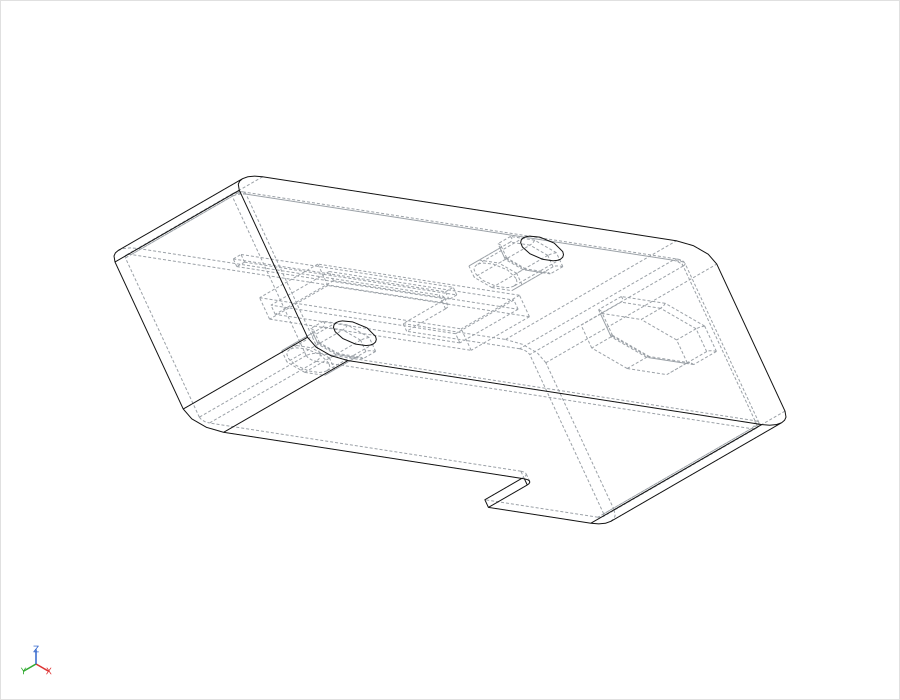
The CH-90 actuator controller housing: a 90 x 60 x 32mm box rising to 44mm at the connector end, drawn as an engineered part first and then given six deliberate design errors. Every figure below comes from the same detectors the app runs, at the app's own mesh resolution, and each one carries how it was obtained. The same part drawn right, the reference, reads Ready to review on every process.
Drag to rotate
An open rectangular housing with a raised end section for a connector. Inside: two parallel ribs forming a slot on the floor, two octagonal standoffs, and a cable-entry boss on the floor of the raised section. Under the rim of one long wall, a snap lip for a clip-on lid. The reference state adds draft to every wall, radii to the rib block, an M3 bore to the standoffs, a gland bore through the boss, widens the slot between the ribs from 3mm to 9mm, and removes the lip.
As designed. Six deliberate design errors, each mapped to a specific check.
As designed, the same checks the app's Compare processes view runs report the following. The app lists a sixth row, sheet metal, which reports Not enough information on a solid housing: its detectors do not read this part as a constant-thickness sheet, so they decline to judge it rather than passing it.
- FDM 3 checks flagged Thin wall: thinnest sampled wall 0.61mm at the standoffs. Bridging: the snap lip read as a 40.1mm unsupported span. Overhang: the lip's underside.
- SLA 3 checks flagged The same three checks, on the same two features: the standoff walls and the snap lip.
- Injection moulding 3 checks flagged Draft angle: 428 of 744 wall facets below 1 degree. Wall uniformity: 19 confirmed thick readings, all on the solid boss. Undercuts: 23.0mm of void under the snap lip on the pull axis.
- Casting 3 checks flagged The same three checks as moulding: no draft, a solid boss, a re-entrant lip.
- CNC 2 checks flagged Tool access: 12 sharp internal corners on the rib block, of 16 on the whole part (the other four are where the snap lip meets the wall, which is why the app's own row reads 16). Deep pockets: the slot between the ribs at 5.0:1 depth to width.
Designed for the process, every one of the five reads Ready to review: every check ran and found nothing to flag. That is the same part drawn right, not the output of the fixes below.
What the app's own fixes achieve on this part
Each fix was applied at the feature the check flagged, with the app's real kernel operations, and rechecked by the same detector. The outcome names what the recheck measured, not what the operation attempted. The parameter each one was given is printed with it: those are the reference part's own values, not the app's defaults, and all but auto-orient reach a user through the AI-planned fix batch rather than a one-click button.
-
H1Fillet the rib blockImproved, not resolved
1.0mm radius. Sharp-corner hits on the rib block 12 → 4: 8 fillets landed of a 14-fillet budget, then the kernel refused the next edge. What remains is four concave edges that still trip the 30 degree check, the worst at 40 degrees, and one of them appeared during the run: none is one of the original square corners.
-
H3Draft the outer wallCheck improved, part worse elsewhere
2 degrees. The angle check flags fewer facets, and that is all it can see: it reports angle against the pull axis, not which way a face leans. One call drafts the whole tangent outer skin and leans it narrower toward the rim, the opposite of what a box parted at its rim needs, and the wall at the rim goes 2.5mm → 1.4mm. The finding improved; the part did not.
-
H4Thicken a standoff wallGeometry changed, issue not improved
2.2mm added, which is the reference part's own wall at that boss and well above the 0.2 to 0.6mm the app's planner is told to choose from. 0.6mm → 2.8mm at the fixed flat, which clears the 0.8mm printable minimum there: five thin readings sat within 2.5mm of that point before, and none do after. The whole-part count barely moves, 79 to 77, and the reason is measured rather than left open. The standoff is octagonal and one flat was thickened, so the others are exactly as thin as they were. Probed at every triangle instead of at a sample, the count rises by four rather than falling by two, because the new material adds facets and those unchanged flats are then read at more points. None of what that finds is thinner material: the thinnest wall anywhere is unchanged. One flat is fixed; the part is not.
-
H5Thin the solid bossGeometry changed, issue not improved
6mm removed, the boss's full height and far more than the 0.3 to 1.0mm the app's planner is told to choose from. Confirmed thick readings at the boss 22 → 33: the count rose. Along the divot's own ray the section clears the cap; around it, it does not.
-
H6Auto-orient for printingNo change
The app's own one-click fix, at its default 45 degree threshold. Auto-orient returned the part as drawn, no change: no orientation it scored beat floor-down, so nothing moved and the lip is still a 40.1mm bridge. For moulding the lip is an undercut with no automatic fix.
No fix closes its loop on this part: nothing above reaches Resolved. The reference state is the same part drawn right, not what these fixes produce. How the part was built
How it works
Analyse, understand, fix, recheck.
Not a list of warnings. A loop that ends with the same checks run again on the changed solid, and a report of what actually moved.
-
1
Analyse
Drop an STL, 3MF or STEP file and choose the process. Every check runs in your browser, on the tessellated geometry.
-
2
Understand
Each finding is marked on the part and names what was measured, how, on how much of the geometry, and why it matters for that process.
-
3
Fix
Supported fixes run on the real solid through the CAD kernel: fillets, draft, hole compensation, countersinks, thickening. Undo if it is not what you wanted.
-
4
Recheck
The same checks run again and report what changed: resolved, improved, remaining, worsened, and anything new the fix itself created.
What kind of claim is this?
Every figure says how it was obtained, and on how much of the part.
Buildable analyses geometry rather than generating generic advice. A ray-cast thickness and a threshold rule are different kinds of claim, and a check that could not run is not a check that passed. The interface says which is which, every time.
- Measured
- Taken directly off the geometry: a boolean overlap volume, a dihedral angle, a floor depth against its rim.
- Measured, sampled
- Measured from a bounded number of probes, so the count reflects the sampling, not every point on the part. Wall thickness and undercut grids work this way.
- Rule-based
- A threshold applied to exact geometry: an overhang angle, a draft angle, a bridge span.
- Heuristic
- An inference that can be wrong on unusual geometry: a wall-uniformity cap derived from the part's own median, a bend radius from discrete curvature.
- Requires validation
- Reported for a human to confirm, not relied on: a bend-relief hit that could also be a fold meeting the part's own edge.
How much of the part a check reached
Between "not evaluated" and "evaluated and clean" there is a third state, and Buildable shows it rather than rounding it away.
-
Evaluated on the whole geometry Every element this check looks at was classified.
-
Evaluated on part of the geometry Some elements were set aside, and the result says how many and why.
-
Not evaluated The check could not run on this geometry, so it makes no claim either way. Never shown as a pass.
The ray casting, mesh topology and kernel operations behind each check are on the engineering page.
Assemblies
Check how the parts work together, not just each part.
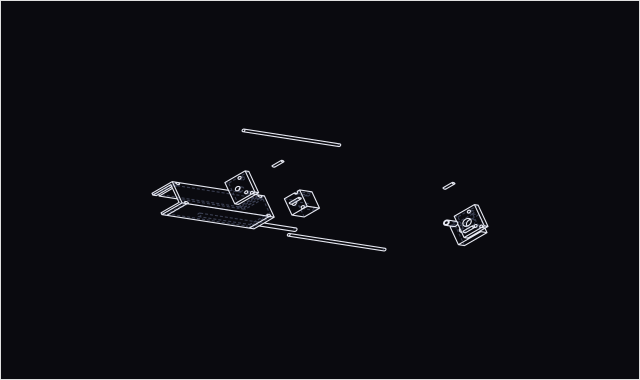
A multi-solid STEP splits into independent parts through the CAD kernel itself, not a mesh heuristic. Every pair close enough to matter gets a true boolean intersection, and an overlap is reported as an exact volume in cubic millimetres. Pull the explode slider and each part comes away along the axis it would really be removed on.
- True interference
- A boolean intersection between solids. Two parts that only touch report zero.
- Scales to real assemblies
- A bounding-box pre-filter skips every pair that cannot overlap; the rest are shared across several kernel instances. If a dense assembly outruns the time budget, Buildable reports how many pairs it checked rather than calling the rest clean. Current cap: 150 parts.
- Never a blank wait
- The part list and the exploded view appear the moment the parts are split. Interference keeps checking in the background with live progress.
Fixes
Automatic where it is safe. Asked where it matters.
Buildable separates refining geometry that is already there from adding geometry that changes the design. Only the second needs your approval, and nothing changes design intent silently. On a STEP upload a sharp CNC corner gets a real internal fillet on its own; a tall, unstable print only gets a stabilising brace once you say yes.
Refines on its own
Changes to geometry that is already there, as real kernel operations on STEP models.
- Filleta sharp internal corner, to a realistic end-mill radius
- Hole compensationa concentric re-cut for print shrink
- Drafta real tilted face along the pull direction
- Wall refinementa cut where a section reads far thicker than the rest
- Reorientthe whole part, to reduce unsupported overhang
Asks first
Anything that adds new material Buildable itself chooses the shape of.
- Bracea gusset fused to the base against tip-over
- Support pillarwelded under an unsupported span
- Wall thickeninga boss welded at a thin spot
- Countersinka conical seat for a flush screw head
You set the parameters
Two explicit toggles, plus a plain-language description of the part and what matters most, give the fix planner its context instead of a guess. Every kernel result passes a validity gate, and an invalid solid is discarded rather than kept. A STEP model with real edits exports back to STEP.
Privacy
Your CAD does not leave your machine.
Every geometry check, the material recommender and assembly interference run in your browser. The file itself is never uploaded for analysis.
- Your file
- Your browser
- Buildable's checks
- Results
Three optional features (result explanations, fix planning and chat) send Claude a small, bounded summary your browser already computed: counts, measurements and the coordinates of flagged locations, never the geometry. What is sent, and when.
Where this is going
From DFM to manufacturing intelligence.
Today Buildable is a DFM and CAD-optimisation tool. The direction is broader: geometry, process and engineering constraints in one place, without claiming to be there yet.
- Today
- Manufacturability analysis across six processes, measured geometry inspection, automatic fixes on supported STEP features, assembly interference.
- Next
- Deeper material trade-offs, process-to-process comparison on the same part, broader assembly-level intelligence.
- Later
- Tolerance review, manufacturing trade-off reasoning across processes, iteration history connected to manufacturing outcomes.